Altimetra skatīšana

BRĪDINĀJUMS

Šis pulkstenis nav paredzēts primārās informācijas par lidojumiem nodrošināšanai un ir izmantojama tikai atbalsta nolūkiem.

  1. Pulksteņa displejā nospiediet UP vai DOWN, lai skatītu altimetra pārskatu.
  2. Nospiediet START.

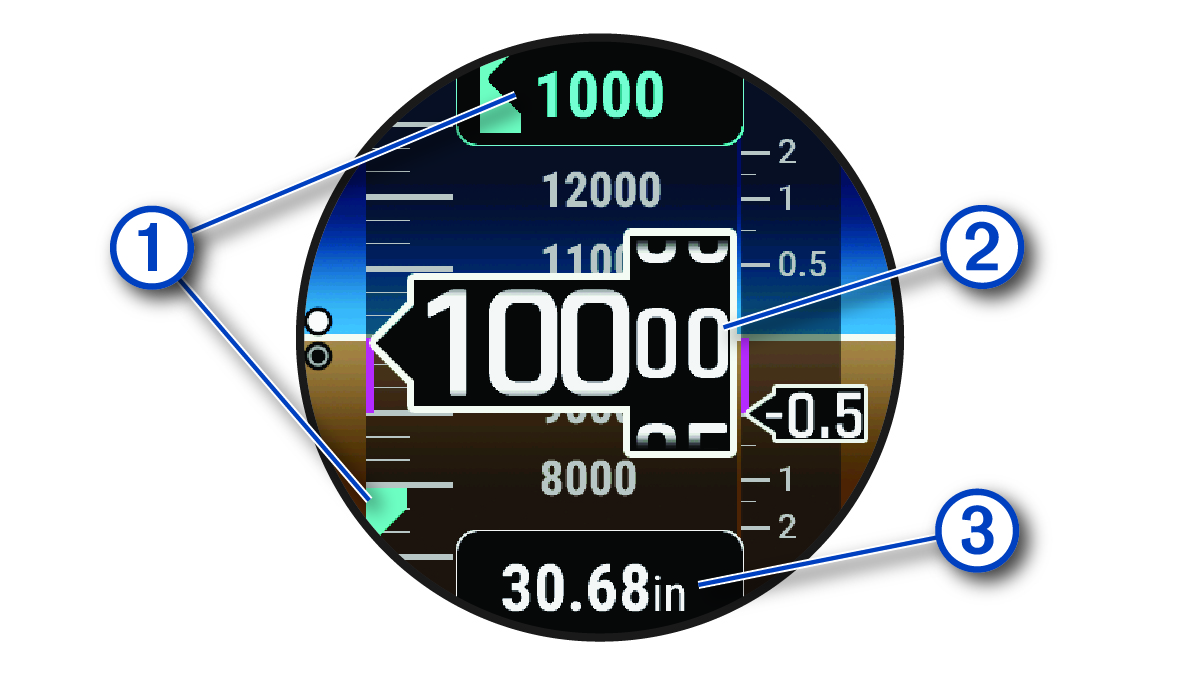
    Altimetra dati ar remarkām

    1

    Brīdinājuma augstums

    2

    Spiediena augstums

    3

    Barometriskais spiediens

Calculating Density Altitude

You can calculate the density altitude at your current location by adjusting the temperature and barometric pressure.

  1. Pulksteņa ciparnīcā nospiediet UP vai DOWN, lai skatītu veiktspējas logrīku.
  2. Press DOWN to view the density altitude calculator.
  3. Press START to enter edit mode.
    PIEZĪME: If weather information is available from the nearest METAR station, the temperature and barometric pressure values are prepopulated and the station identifier appears.
  4. Select Spiediens, and press UP or DOWN to adjust the barometric pressure until the Norādītais alt. value matches your known elevation or mean sea level (MSL).

    The density altitude calculation updates as you modify the value.

  5. Nospiediet START, lai saglabātu atrašanās vietu.
  6. Select Temp., and press UP or DOWN to set the temperature to the outside air temperature.

    The density altitude calculation updates as you modify the value.

  7. Nospiediet START, lai saglabātu atrašanās vietu.
  8. Press BACK to exit edit mode.
GUID-85E8D94D-E009-4EDD-A980-C9EE59C1F323 v13
Augusts 2025