Installing the Infotainment System

To install the infotainment system, you need a custom metal bracket supplied by the RV manufacturer.

  1. Remove the dash trim and bezel around the stereo installation location.
  2. If necessary, attach the metal bracket supplied by the RV manufacturer to the dash according to the RV manufacturer specifications.
  3. Connect the included wiring harnesses to the vehicle wiring harness and other A/V connectors as needed.

    You can consult the wiring diagrams to identify specific connectors and wires (Wiring Harnesses).

  4. Route all harnesses and other wiring through the opening in the dashboard, and make all necessary wiring connections to the back of the infotainment system (Connector Identification).
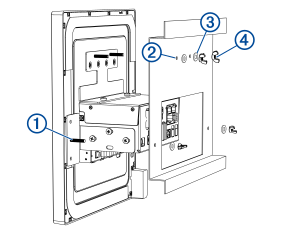
  5. Place the RV-IN1501 infotainment system into the bracket and dashboard, inserting the four threaded rods Callout number one through the four holes Callout number two in the bracket.

    Line drawing of device installation with a custom bracket with callouts
  6. Place the four included washers Callout number three onto the threaded rods.
  7. Thread the four included wingnuts Callout number four onto the threaded rods, and tighten them to secure the infotainment system to the bracket.
  8. Install the dashboard trim and bezel around the infotainment system.
Copyright © Garmin. All rights reserved.GUID-811CF923-05C5-4722-B874-97869503F42E v2