System Bypass
The Garmin OnBoard™ engine cutoff system is designed with two methods you can use to bypass the system. These methods allow you disable engine control and restore typical functionality in the case of an emergency.
Bypassing the System From a Chartplotter
One method to bypass the Garmin OnBoard engine cutoff system is by using a connected chartplotter.
-
Select Yes in the message that reads Do you want to be able to restart the engine now?1
-
Select
 > Communications > NMEA 2000 Setup > Device List, select the GOS 10 Hub, then select .
The Garmin OnBoard engine cutoff system is now disabled, and the engines should be restored to previous functionality.
To restore the Garmin OnBoard engine cutoff system functionality, select > Communications > NMEA 2000 Setup > Device List, select the GOS 10 Hub, then .
Bypassing the System from the GOS 10 Hub
If bypassing the Garmin OnBoard engine cutoff system using a connected chartplotter does not work as expected, or if you prefer to use a different method, you can bypass the system directly from the GOS™ 10 hub.
Because the hardware-bypass feature requires access to the GOS 10 hub, you should install the hub in an easily-accessible location as noted in the Mounting Considerations chapter in the installation instructions. Mounting the GOS 10 hub in a tight or inaccessible location will affect your ability to bypass the system using this method.
-
Disconnect the wiring harness
from the GOS 10 hub.
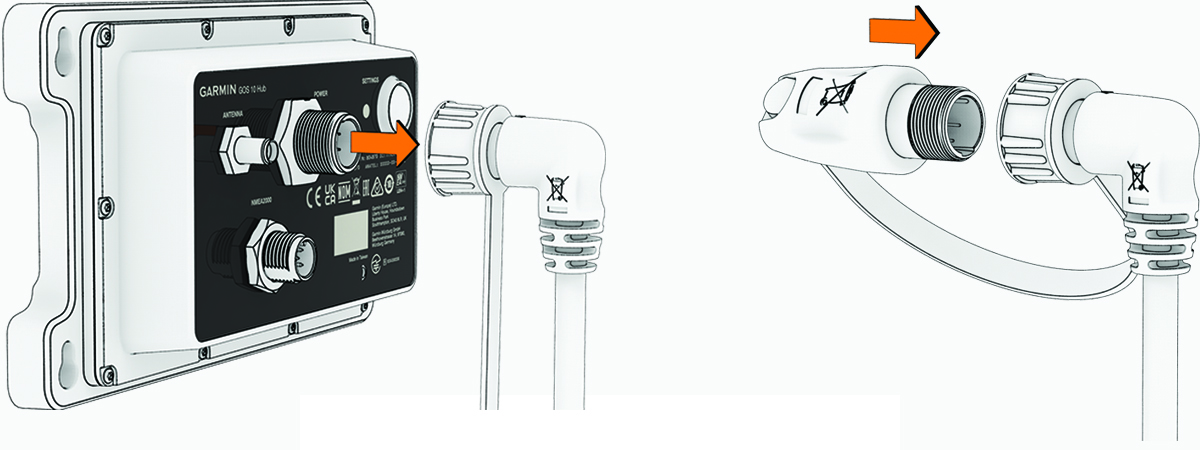
To restore the Garmin OnBoard engine cutoff system again, disconnect the bypass module and reconnect the wiring harness to the GOS 10 hub.