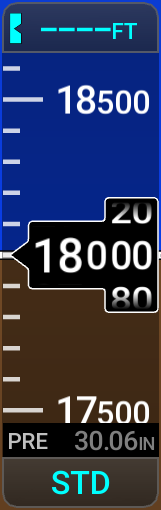
Datum Pressure (Baro Pressure Setting)
The datum pressure is displayed below the Altimeter in inches of mercury (in Hg), hectopascals (hPa), or millibars inside a Kollsman window. Using the DCK on the display bezel is the standard method to control the datum pressure setting but is configurable by the pilot (see Knob Operation in the System Overview chapter for more information on configuring the DCKs). In the case the DCK is configured to control other features, touching the Kollsman window on the PFW opens a numeric keypad to adjust the setting.
The system will alert the pilot when the standard altimeter setting is required after climbing or descending through a specific altitude. The standard barometric transition altitude is 18,000ft (FL180) but is adjustable to a different altitude if needed (Refer to the Enabling/Disabling the 'Baro Transition' Alert procedure for more information on adjusting this altitude alert setting). While the aircraft is transitioning through this transition altitude the Kollsman window will flash cyan until the pilot has taken action to change the barometric setting. The standard setting feature allows pilots to quickly adjust the altimeter setting to and from the standard barometric setting. While the standard barometric setting is selected, STD is displayed in place of the barometric pressure setting. While the standard setting is being used, a standby barometric altimeter setting may be selected for a quick adjustment back to the local barometric setting.