Wrist Heart Rate
Your watch has a wrist-based heart rate monitor, and you can view your heart rate data on the heart rate glance (Viewing Glances).
Wearing the Watch
Some users may experience skin irritation after prolonged use of the watch, especially if the user has sensitive skin or allergies. If you notice any skin irritation, remove the watch and give your skin time to heal. To help prevent skin irritation, ensure the watch is clean and dry, and do not overtighten the watch on your wrist. For more information, go to garmin.com/fitandcare.
-
Wear the watch above your wrist bone.
NOTE: The watch should be snug but comfortable. For more accurate heart rate readings, the watch should not shift while running or exercising. For pulse oximeter readings, you should remain motionless.
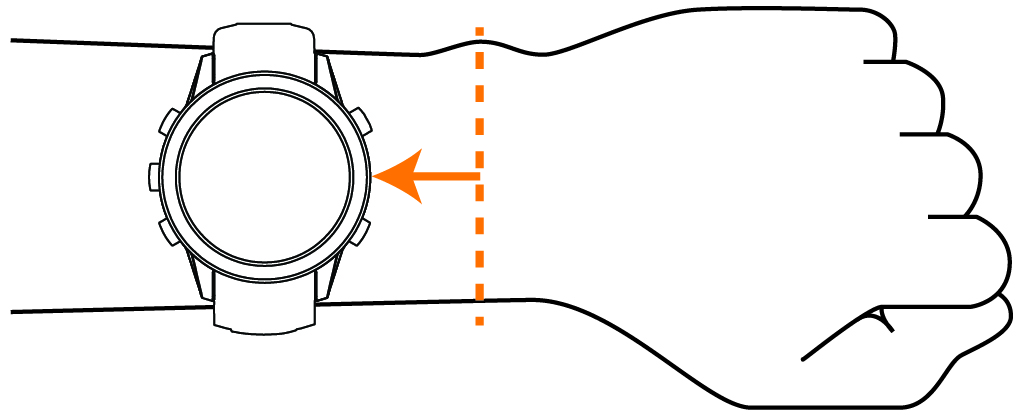
NOTE: While diving, the watch should stay in contact with your skin, and it should not bump into other wrist-worn devices.NOTE: The optical sensor is located on the back of the watch.
Tips for Erratic Heart Rate Data
If the heart rate data is erratic or does not appear, you can try these tips. For more information on your heart rate sensor, go to garmin.com/heartrate.
Wrist Heart Rate Monitor Settings
From the watch face, hold  , and select
.
, and select
.
- Status
-
Enables the wrist heart rate monitor. The default value is Auto, which automatically uses the wrist heart rate monitor unless you pair an external heart rate monitor.
NOTE: Disabling the wrist heart rate monitor also disables the wrist-based pulse oximeter sensor. You can perform a manual reading from the pulse oximeter glance. - Source Switching
-
Selects the best source of heart rate data when wearing your watch and an external heart rate monitor. For more information, go to www.garmin.com/dynamicsourceswitching/.
- Broadcast Heart Rate
-
Broadcasts your heart rate data to a paired device (Broadcasting Heart Rate Data).
Broadcasting Heart Rate Data
You can broadcast your heart rate data from your watch and view it on paired devices. Broadcasting heart rate data decreases battery life.
-
Select an option:
-
Hold
, and select
.
-
Hold
 to open the controls menu, and select
  . NOTE: You can add options to the controls menu (Customizing the Controls Menu).
-
-
Press
 .
.
The watch starts broadcasting your heart rate data.
-
Press
to stop broadcasting your heart rate data.