Viewing Tide Information
Tide information is for information purposes only. It is your responsibility to heed all posted water-related guidance, to remain aware of your surroundings, and to use safe judgment in, on, and around the water at all times. Failure to heed this warning could result in serious personal injury or death.
You can view information about a tide station, including the tide height and when the next high and low tides will occur. You can save up to ten tide stations.
-
Select an option:
-
From the watch face, press
 .
. -
From the watch face, press
 .
.
-
-
Select an option:
-
To use your current location when you are near a tide station, select Current Location.
-
To enter coordinates for a location, select Coordinates.
-
To select a location on the map, select Use Map.
-
To select a saved location, select Saved Locations.
-
To enter the name of a city, select City Search.
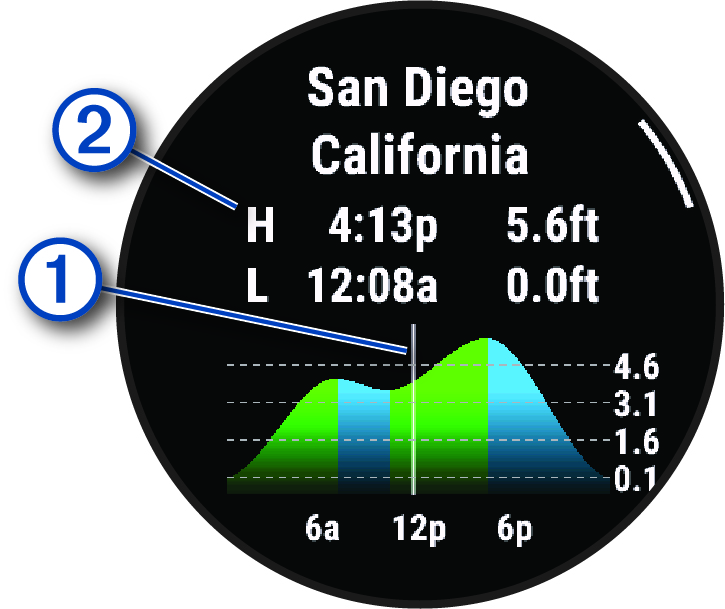
A 24-hour tide chart appears for the current date with the current tide height and information about the next high and low tides .
-
-
Press
to see tide information for upcoming days.
-
Press , and select Set as Favorite to set this location as your favorite tide station
(optional).
Your favorite tide station appears at the top of the list in the app and in the glance.
TIP: To add more tide stations, you can press , select , and follow the instructions in step 3.
Setting a Tide Alert
- From the Tides app, select a saved tide station.
-
Press
, and select
Set Alerts.
-
Select an option:
-
To set an alarm to sound before the peak tide, select Til High Tide.
-
To set an alarm to sound before the low tide, select Til Low Tide.
-