Installing the Fist Mic

NOTICE

If you are mounting the device on fiberglass, when drilling the pilot holes, use a countersink bit to drill a clearance chamfer through only the top gel-coat layer. This will help to avoid cracking in the gel-coat layer when the screws are tightened.

The fist mic connects to the radio wirelessly and is paired with the radio at the factory. If you need to pair the fist mic again, see the Owner's Manual at garmin.com/manuals/SignalVHF for instructions.

The fist mic power cable has a built-in cable gland that connects to the bulkhead to provide strain relief and allow for the wire connections to be protected behind the mounting surface.

  1. Using a 10 mm (3/8 in.) drill bit, drill the cable pass-through hole through the mounting surface.
  2. Route power cable from the power supply and out through the cable pass-through hole.
  3. Select an option:
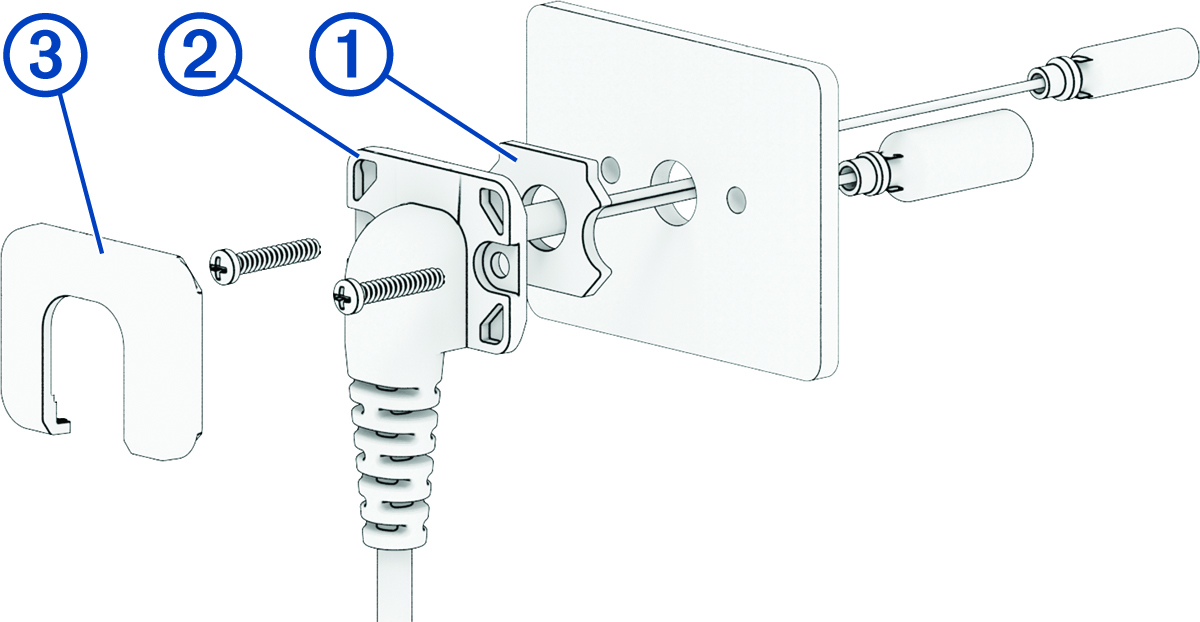
    • If you are installing the device in a dry location, feed the fist mic cable through the self-adhesive gasket 1, peel off the adhesive backing liner, and affix the gasket to the inside of the cable gland 2.


      Fist mic deck gland installation with callouts
      NOTE: You should examine the shape of the gasket and make sure its orientation is correct. The gasket and the inside of the cable gland have matching features to ensure a good seal.
    • If you are installing the device in a location that is exposed to water, do not install the self-adhesive gasket.

      You must apply silicone-based marine sealant to the mounting surface immediately before securing the cable gland to the mounting surface.

  4. Connect the red and black wires from the fist mic to the corresponding wires from the power supply.
    TIP: You should connect the device and the fist mic to the same circuit, so that both devices are always turned on and off together.
  5. Feed the fist mic cable into the mounting surface and place the cable gland flush against the surface.
  6. Mark the location of the pilot holes for the mounting screws.
  7. Remove the cable gland from the mounting surface, and drill the pilot holes using a 2 mm (3/32 in.) drill bit.
    NOTICE

    Do not drill the pilot holes through the mounting holes on the cable gland, to avoid damaging it.

  8. If you did not install the self-adhesive gasket on the cable gland, apply silicone-based marine sealant to the mounting surface around the cable pass-through hole.
    NOTICE

    You should apply marine sealant only if you did not install the self-adhesive gasket. Using sealant and the gasket together may reduce water resistance.

  9. Feed the fist mic cable into the mounting surface again and place the cable gland flush against the surface.
  10. Secure the cable gland to the mounting surface using the included screws.
    NOTICE

    Do not overtighten the screws. Overtightening the screws may damage the device or the mounting surface.

  11. Snap the screw cover 3 over the screw heads on the cable gland.
GUID-60E76EAD-A560-449E-A528-6C89D9026DB3 v1
May 2026