Tread Audio App
Before you can use the controls in the Tread® Audio app, you must install your Tread Audio Box and Tread 6.5" XS-LED Tower Speakers in your vehicle and pair the Tread Audio Box with the Tread Audio app.
|
|
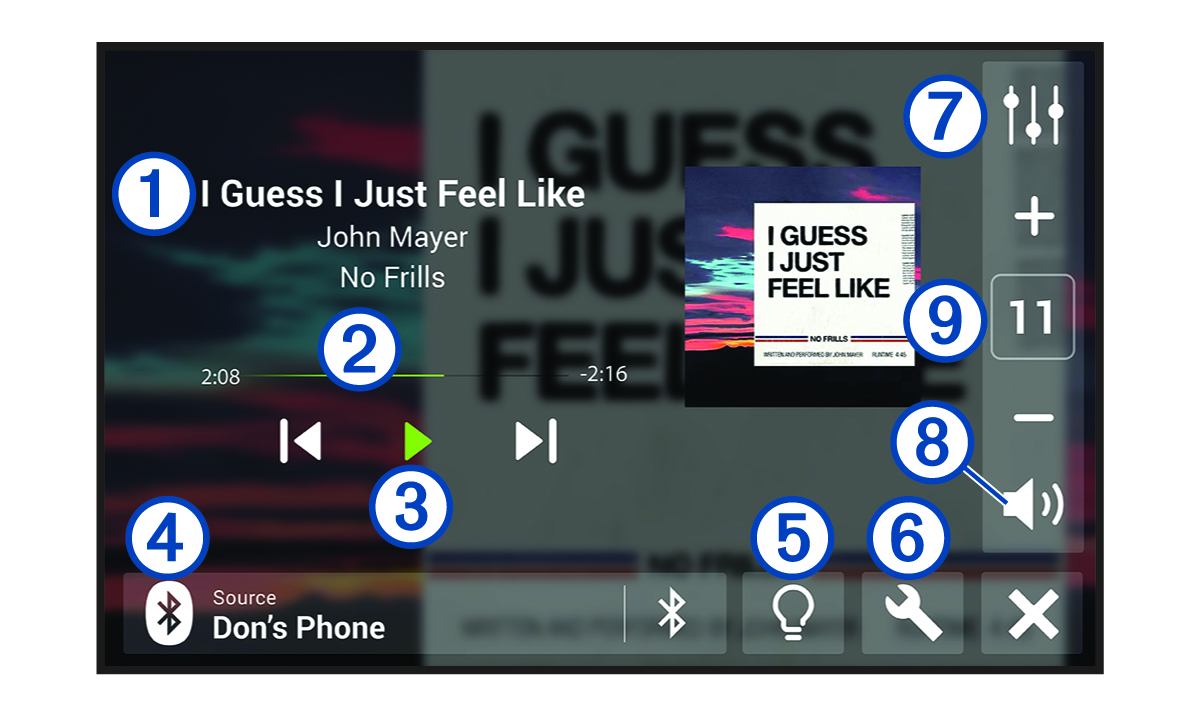
Displays information about the currently playing media, such as title, artist, album, station, or channel. |
|---|---|
|
|
Displays progress through the current media item. |
|
|
Displays playback controls. The controls change based on the service providing the media. |
|
|
Displays the current audio source. |
|
|
Opens the LED controls. |
|
|
Opens the app settings menu. |
|
|
Opens the volume zone controls. |
|
|
Mutes the audio. |
|
|
Increases or decreases the volume. |
 indicates the media is being played by another media app on your phone and sent to the device using a
Bluetooth® media connection.
indicates the media is being played by another media app on your phone and sent to the device using a
Bluetooth® media connection.