Training Modes
- Powered and Connected
-
All features are available when the trainer is plugged into external power and connected to the Tacx® Training app.
- Powerd and Standalone
-
When the trainer is not connected to an app or an Edge® bike computer, the trainer simulates a flat road. The faster you ride, the higher the resistance.
Connecting the Power Cable and Pairing the Trainer
The power cable is in the product box. Do not attempt to use a third-party power cable or adapter with the Tacx FLUX 2/S trainer because this could lead to personal injury or damage to the trainer.
-
Plug the power cable connector into the Tacx FLUX 2/S port.
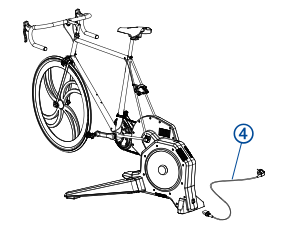
-
Plug the power cable into a standard
wall outlet.
The
 LED flashes
  (blue) continuously to indicate that the trainer is in secure pairing mode. For
more information, go to garmin.com/connectiontypes.
(blue) continuously to indicate that the trainer is in secure pairing mode. For
more information, go to garmin.com/connectiontypes. -
Select an option:
-
Scan the QR code with the camera on your phone.

-
To add the Tacx FLUX 2/S trainer to your existing account, open the Tacx Training app, and select .
-
-
Start pedaling.
The
LED is solid (blue) when the trainer is controlled by the app. For more information, see LED Status.
Tacx Training App
-
Ride exciting courses without leaving your home.
-
Create your own rides, workouts, and more.
-
Manage your training, customize the default settings, and diagnose issues.
-
Sync your indoor training data with your Garmin Connect™ account.
-
Update your trainer software.
LED Status
The LEDs change based on the trainer status and type of connection. For more information, go to garmin.com/connectiontypes.
|
LED Activity |
Status |
|---|---|
|
The |
The trainer is in secure Bluetooth® pairing mode. |
|
The |
The trainer is in open Bluetooth pairing mode. |
|
The |
The trainer is controlled by your Bluetooth device. During
a software update, the |
|
The ANT+
LED flashes |
The trainer is in ANT+® pairing mode. |
|
The ANT+
LED is solid |
The trainer is controlled by your ANT+ device. |
|
The |
The trainer is active and working properly. |
|
The |
Indicates a trainer error. You can check the Tacx Training app for more information. During a software update, this indicates the update failed. |
|
The |
The trainer is calibrating. For more information, go to support.garmin.com. |
 (green) 3 times.
 (red).
 (orange).