Installing the Stereo Using the Mounting Kit
-
Using the template as a guide, remove material from the dashboard around the screw locations
 with a rotary cutting tool, utility knife, or a file.
Make sure you remove only enough material to allow the screws clearance, because there is not significant space between the screws and the edge of the stereo. Removing excess dashboard material may be visible after installation, and could allow for unwanted water ingress.
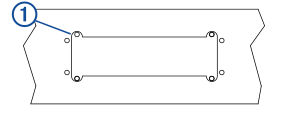
-
Select an option:
-
If you are installing the stereo in a dry location, place the mounting gasket
 (included in the stereo box) on the back of the stereo.
-
If you are installing the stereo in a location that is exposed to water, apply silicone-based marine sealant on the mounting surface around the cutout.
Do not install the mounting gasket if you applied sealant to the mounting surface. Using sealant and the mounting gasket may reduce water resistance.
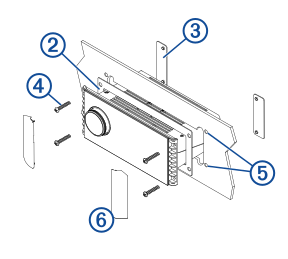
-
-
Secure the stereo to the included mounting plates
 behind the dashboard using the screws included in the kit
  .
.
You must use the screws provided in the kit instead of the screws provided with the stereo. The screws included in the kit are designed for use with the mounting plates.
-
If you are replacing a previous stereo, fill the screw holes from the previous stereo installation
 with marine sealant.
Failure to completely fill the previous screw holes with marine sealant may allow for water ingress behind the dashboard.
-
Snap the screw covers
 into place on the sides of the stereo.
NOTE: If you are replacing a previous stereo, you must use the included screw covers when installing the stereo using this kit. The screw covers included with the stereo are smaller, and do not visually cover the screw holes from the previous stereo installation.
into place on the sides of the stereo.
NOTE: If you are replacing a previous stereo, you must use the included screw covers when installing the stereo using this kit. The screw covers included with the stereo are smaller, and do not visually cover the screw holes from the previous stereo installation.