HDMI Out Video Considerations
To prevent corrosion due to moisture, you must use Garmin® accessory cables when connecting the chartplotter to the video display. Using different cables voids your warranty.
The GPSMAP® 12x3/16x3 chartplotter models have HDMI® out capability to duplicate the chartplotter screen on another device, such as a television or monitor.
The Garmin HDMI accessory cable is 4.5 m (15 ft.) long. If you need a longer cable, you should use an active HDMI cable only. You need an HDMI coupler to connect the two HDMI cables.
You must make all cable connections in a dry environment.
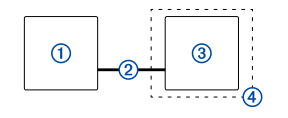
|
Item |
Description |
|---|---|
|
|
GPSMAP 12x3/16x3 chartplotter |
|
|
Garmin HDMI cable (HDMI OUT) |
|
|
Display with an HDMI In port, such as a monitor or television |
|
|
Dry environment, protected from moisture |