Stereo Screen
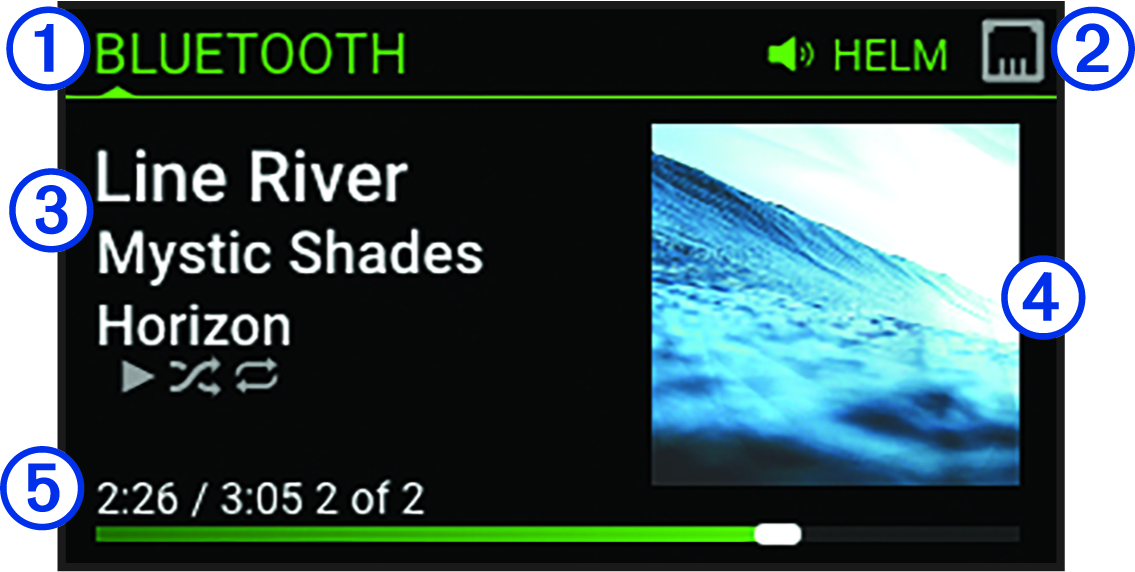
The information displayed on the screen varies depending on the source selected. This example shows a track playing on a device connected using Bluetooth® wireless technology.
NOTE:
The screen shown is from a connected remote control, such as an
Fusion Apollo™ ERX400. If you are using your chartplotter to control the stereo, see your chartplotter's owner's manual for more information.
|
|
Source name |
|---|---|
|
|
Active zone and status icons (Network Status Icons) |
|
|
Track details (if available) |
|
|
Album art (if available from a compatible source) |
|
|
Elapsed time, track duration, and the current track number out of the total number of tracks in the playlist (if available) |


