System Bypass

The Garmin OnBoard™ engine cutoff system is designed with two methods you can use to bypass the system. These methods allow you disable engine control and restore typical functionality in the case of an emergency.

Bypassing the System From a Chartplotter

One method to bypass the Garmin OnBoard engine cutoff system is by using a connected chartplotter.

NOTE: Bypassing the engine cutoff system using the chartplotter is possible only when the system has cut off the engines due to a man overboard event with a Captain tag, or when testing the system. This option is not available during normal operation.
Within 30 seconds after the system has cut off the engines, select one of these options on a connected chartplotter:
  • Select Yes in the message that reads Do you want to be able to restart the engine now?1

  • On an MOB screen, select Disable Cutoff.1

  • Select Settings menu > Communications > NMEA 2000 Setup > Device List, select the GOS 10 Hub, then select Review > Engine Cutoff > Disable.

The Garmin OnBoard engine cutoff system is now disabled, and the engines should be restored to previous functionality.

NOTICE
The system remains disabled until you enable it again or until you turn off the system and turn it back on again. You must enable the system as soon as possible to be compliant with the AYBC A-33 standard.

To restore the Garmin OnBoard engine cutoff system functionality, select Settings menu > Communications > NMEA 2000 Setup > Device List, select the GOS 10 Hub, then Review > Engine Cutoff > Enable.

Bypassing the System from the GOS 10 Hub

If bypassing the Garmin OnBoard engine cutoff system using a connected chartplotter does not work as expected, or if you prefer to use a different method, you can bypass the system directly from the GOS™ 10 hub.

  1. Disconnect the wiring harness from the GOS 10 hub.
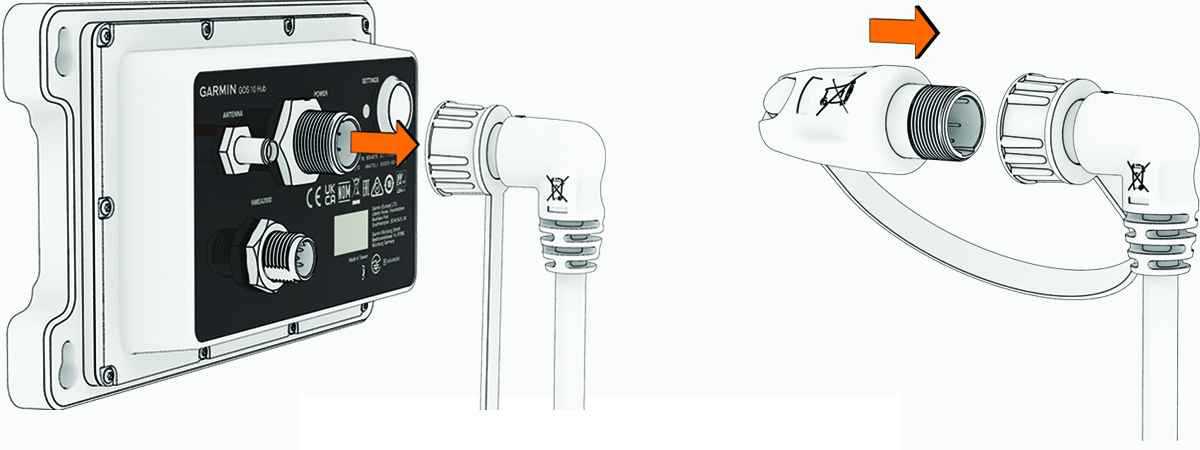
    Bypassing the system
  2. Connect the bypass module to the wiring harness connector, and tighten the locking ring.

    The bypass module should be tethered to the connector end of the wiring harness.

    The Garmin OnBoard engine cutoff system is now disabled, and the engines should be restored to previous functionality.

    NOTICE
    The system remains disabled until you enable it again. You must enable the system as soon as possible to be compliant with the AYBC A-33 standard.

To restore the Garmin OnBoard engine cutoff system again, disconnect the bypass module and reconnect the wiring harness to the GOS 10 hub.

1 This option is available only during an man-overboard event initiated by an MOB tag with the captain role. This message does not appear when testing the system.
GUID-363DF15D-D1F1-4CBC-A87E-79F38BA2BE0D v2
October 2025