Music Player Overview
The information displayed on the music screen varies depending on the source selected. The on-screen playback controls may change depending on the source selected (Playback Controls). This example shows the stereo playing a track from the USB device connected to the USB port.
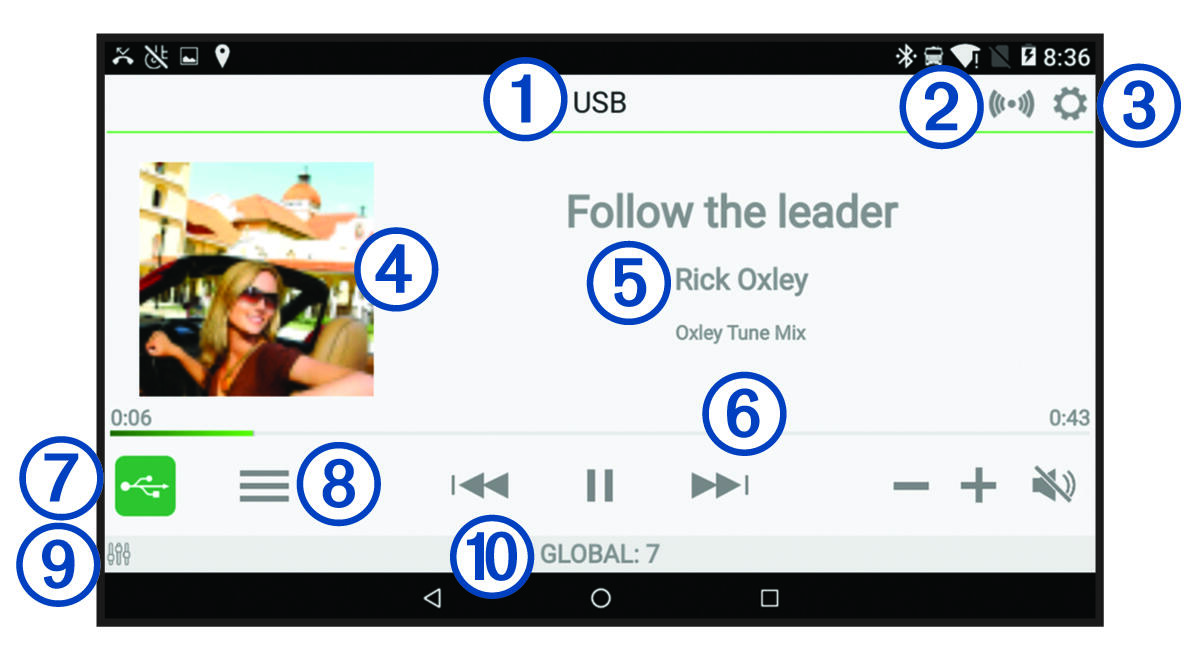
|
| Source |
|---|---|
|
| Network status (Network Status Icons) |
|
| Select to open the stereo settings menu. |
|
| Album art (if available from a compatible source) |
|
| Track details (if available) |
|
| Elapsed time, track duration and the current track number out of the total number of tracks in the playlist (if available) |
|
| Select to change the source (Selecting a Source). |
|
| Select to open a menu for the current source. Not available on all sources. |
|
| Select to adjust the volume or change speaker zones. |
|
| Speaker zone and volume level. |


