Playing Golf
Before you play a course for the first time, you must download it from the Garmin Golf™ app (Garmin Golf App).
Before you play golf, you should charge the watch (Charging the Watch).
-
From the watch face, press
 .
.
-
Select
 to keep score.
-
Select a tee box.
The hole information screen appears.
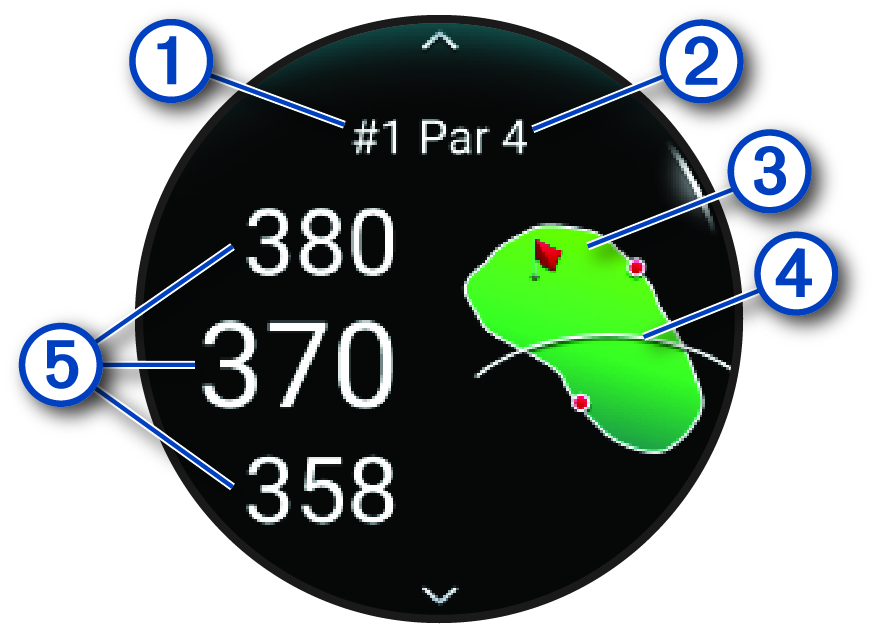
Current hole number
Par for the hole
Map of the hole
Driver distance from the tee box
Distances to the front, middle, and back of the green
NOTE: Because pin locations change, the watch calculates the distance to the front, middle, and back of the green, but not the actual pin location. -
Select an option:
-
Tap the map to view more detail or change the flag location (Moving the Flag).
-
Swipe up or down to scroll through the holes.
-
Press
to open the golf menu (Golf Menu).
-
Hold
 to open the golf settings (Golf Settings).
-
When you move to the next hole, the watch automatically transitions to display the new hole information.