Flight Director Modes
Flight director modes are normally selected independently for the pitch and roll axes. In the absence of specific mode selections, the flight director activates into the default pitch and/or roll mode(s). Unless otherwise specified, all FD mode selection keys on the AFCS Controller are alternate action (i.e., press on, press off). These mode keys are also accompanied by annunciator lights which illuminate when their respective modes are active on the AXIS™ Flight Display Autopilot Interface.
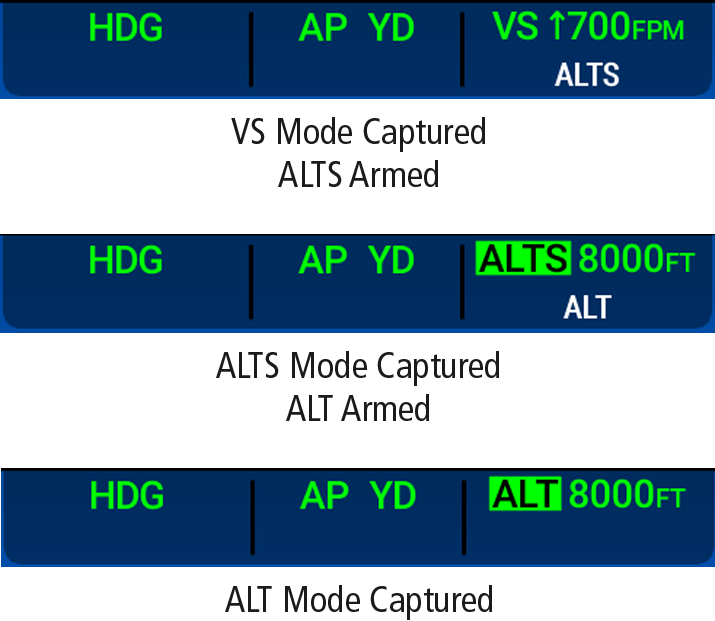
Armed modes are annunciated in white and active in green in the AFCS Status Box. Automatic mode transition from armed to active is indicated by the armed mode annunciation moving to the active mode field and displaying in inverse green and black for ten seconds (as demonstrated in the following figure).
If the information required to compute a FD mode becomes invalid or unavailable, the FD automatically reverts to the default mode for that axis. A flashing amber mode annunciation indicate loss of sensor (ADC) or navigation data (e.g., VOR, LOC, or GPS) required to compute commands. When such a loss occurs, the system automatically reverts to Roll Hold and/or either Pitch Hold or Flight Path Angle Mode, depending on the affected axis(es) (refer to the corresponding FD mode sections for explanation of FD behavior in each mode). The flashing annunciation stops when the affected mode key is pressed or another mode for the axis is selected. If after 10 seconds no action has been taken, the flashing annunciation stops.
