HDMI Out Video Considerations
To prevent corrosion due to moisture, you must use Garmin® GPSMAP® accessory cables when connecting the chartplotter to the video display. Using different cables voids your warranty.
Through the HDMI OUT port, you can duplicate the chartplotter screen on another device, such as a television or monitor.
The Garmin GPSMAP HDMI accessory cable is 4.5 m (15 ft.) long. If you need a longer cable, you should use an active HDMI cable only. You need an HDMI coupler to connect the two HDMI cables.
You must make all cable connections in a dry environment.
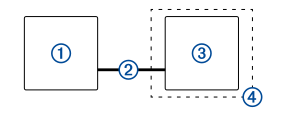
|
Item |
Description |
|---|---|
|
|
GPSMAP 1222/1242 Touch chartplotter |
|
|
GPSMAP HDMI cable (HDMI OUT) |
|
|
Display with an HDMI In port, such as a computer or television |
|
|
Dry environment, protected from moisture |


