Getting Your FTP Estimate
The device uses your user profile information from the initial setup to estimate your functional threshold power (FTP). For a more accurate FTP value, you can conduct an FTP test using a paired power meter and heart rate monitor.
 > My Stats > Power > FTP.
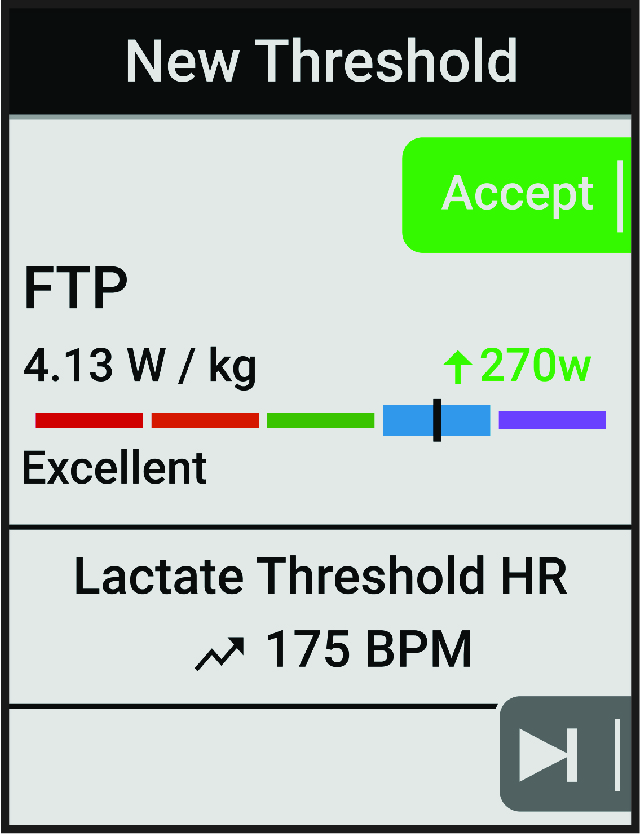
Your FTP estimate appears as a value measured in watts per kilogram, your power output in watts, and a position on the color gauge.
|
|
Superior |
|---|---|
|
|
Excellent |
|
|
Good |
|
|
Fair |
|
|
Untrained |
 Purple
 Blue
Blue
 Green
Green
 Orange
 Red
Red
For more information, see the appendix ( FTP Ratings).
Automatically Calculating FTP
Before the device can calculate your functional threshold power (FTP), you must have a paired power meter and heart rate monitor (Pairing Your Wireless Sensors).
-
Select
> My Stats > Power > FTP >
 > Auto Detect FTP.
-
Select
> My Stats > Power > FTP.
Your FTP appears as a value measured in watts per kilogram, your power output in watts, and a position on the color gauge.