Third-Party Touchscreen Connection Considerations
When connecting a third-party touchscreen to view and control the GPSMAP® 9500 device, you must observe these considerations.
-
The video data is sent over the HDMI® connection.
-
The touch data is sent over the USB connection.
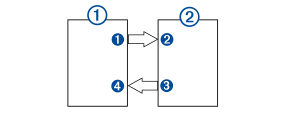
Devices
|
Item |
Device |
|---|---|
|
|
GPSMAP chartplotter |
|
|
Third-party touchscreen monitor |


Connections
|
From |
To |
Cable |
|---|---|---|
|
Chartplotter's HDMI OUT port |
Monitor's HDMI IN port |
Garmin® HDMI Cable (010-12390-20) |
|
Monitor's USB port |
Chartplotter's USB port |
Garmin USB-C to USB-A Adapter Cable (010-12390-12) |


NOTE:
If the monitor is not a touchscreen, you should install a
GRID™ remote input device or a
GRID 20 remote input device so you can interact with the chartplotter.