Sail Racing
You can use the device to help you cross the start line of a race exactly when the race begins. When you synchronize the regatta timer in the sail racing app with the official race countdown timer, you are alerted at one-minute intervals as the race start approaches. When you set the starting line, the device uses GPS data to indicate whether your boat will cross the start line before, after, or at the correct time to start the race.
Setting the Starting Line
-
From the watch face, press
 .
.
- Select .
- Wait while the device locates satellites.
-
Hold
 .
.
- Select Start Line Settings.
-
Select an option:
-
Select Mark Port to mark the port starting line mark as you sail past it.
-
Select Mark Starboard to mark the starboard starting line mark as you sail past it.
-
Select Time to Burn to enable or disable the time to burn data on the regatta timer data screen.
-
Select Distance to Start to set the distance to the start line, preferred distance units, and length of your boat.
-
Starting a Race
Before you can view the time to burn, you must set the starting line (Setting the Starting Line).
-
From the watch face, press
.
-
Wait while the watch locates satellites.
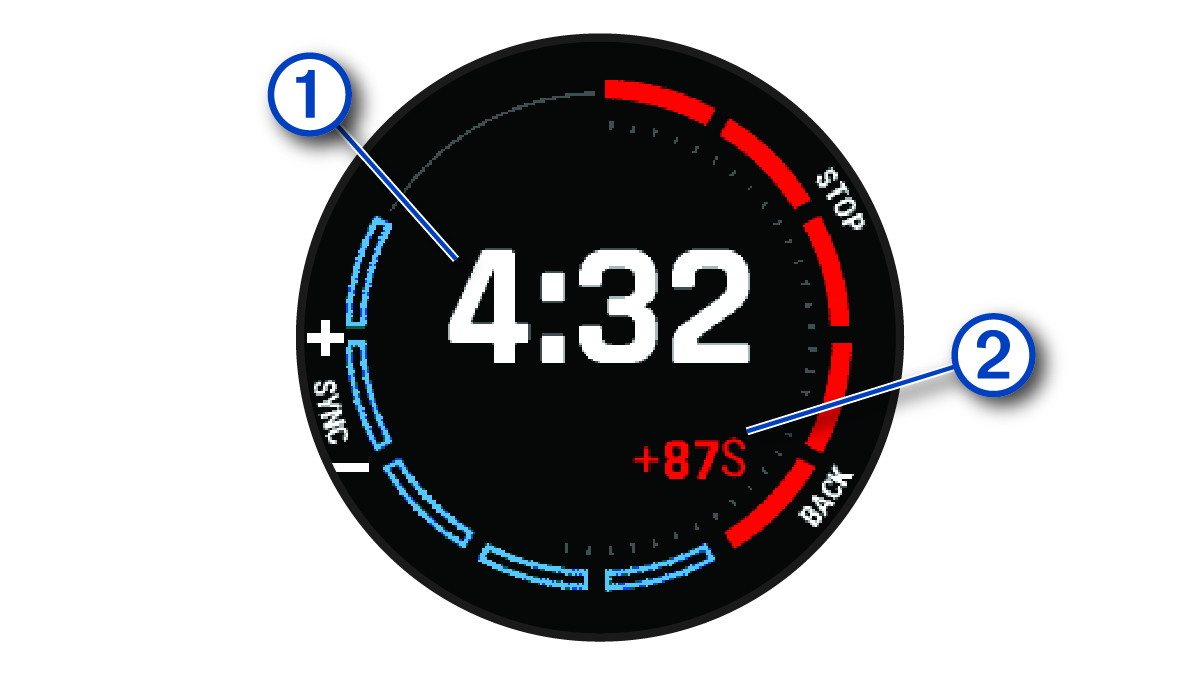
The screen displays the regatta timer and time to burn .
-
If necessary, hold
, and select an option:
-
To set a fixed timer, select , and enter a length of time.
-
To set a start time within the next 24 hours, select , and enter a time of day.
-
-
Press
.
-
Press
and
 to synchronize the regatta timer with the official race countdown.
NOTE: When the burn time is negative, you will arrive at the start line after the race starts. When the burn time is positive, you will arrive at the start line before the race starts.
to synchronize the regatta timer with the official race countdown.
NOTE: When the burn time is negative, you will arrive at the start line after the race starts. When the burn time is positive, you will arrive at the start line before the race starts. -
Press
to start the activity timer.