Starting a Session for Other Projectiles
NOTICE
Always ensure you position the chronograph so that it is not directly exposed to ejecting cartridge cases, muzzle blast, or other hazards that may damage the chronograph.
You can use the Xero C1 chronograph to measure velocity of other projectiles that may not fit into other categories, such as some muzzleloading firearms, shotguns with slugs, slingshots, or other weapons.
- Select NEW SESSION > OTHER.
- Select a velocity range.
- If you have enabled the PROJECTILE WEIGHT ENTRY setting (Pro Settings), select an option:
- To calculate the kinetic energy of your projectile, select YES, and enter the weight of your projectile.
- To continue without calculating kinetic energy, select SKIP.
- Point the chronograph at the target with the screen facing you.
- Position the weapon next to the chronograph, within 15 cm (5 in.)
 to 35 cm (15 in.)
  of the chronograph.
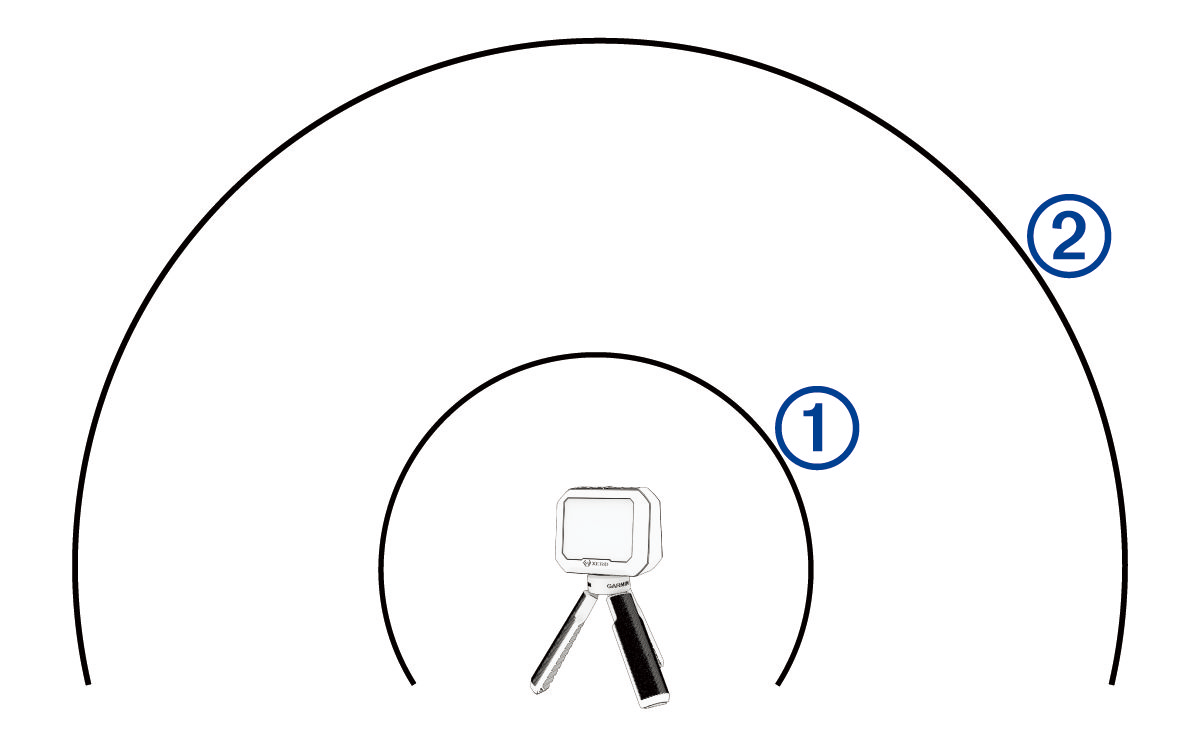
NOTE: The weapon can be positioned at any point around the chronograph as long as the weapon and chronograph are positioned 15 to 35 cm (5 to 15 in.) away from each other. You should choose a location that works best for your weapon.
The device detects shots and displays measurements automatically as you shoot.