Controls
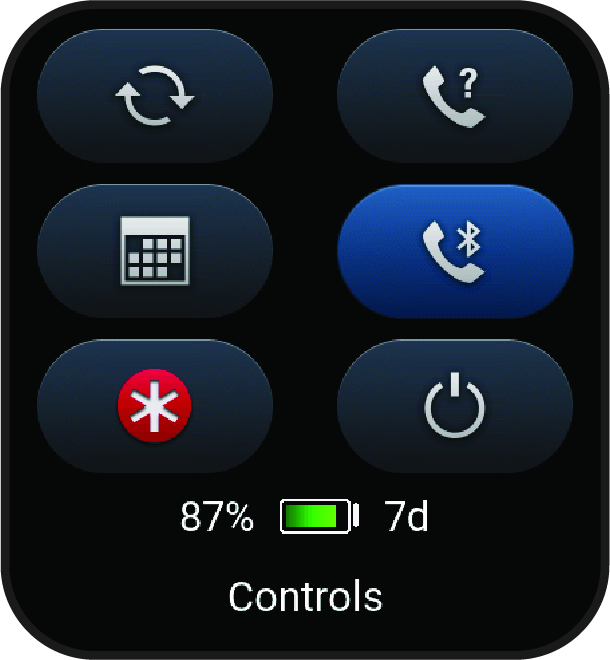
The controls menu lets you quickly access watch features and options. You can add, reorder, and remove the options in the controls menu (Customizing the Controls Menu).
From any screen, hold  .
.
|
Icon |
Name |
Description |
|---|---|---|
|
|
ABC |
Select to open the altimeter, barometer, and compass app. |
|
|
Airplane Mode |
Select to enable or disable airplane mode to turn off all wireless communications. |
|
|
Alarm Clock |
Select to open the alarm clocks app (Setting an Alarm). |
|
|
Altimeter |
Select to open the altimeter screen. |
|
|
Alt. Time Zones |
Select to view the current time of day in additional time zones. |
|
|
Assistance |
Select to send an assistance request (Requesting Assistance). |
|
|
Battery Saver |
Select to enable or disable the battery saver feature (Controls). |
|
|
Brightness |
Select to adjust the screen brightness (Display and Brightness Settings). |
|
|
Broadcast Heart Rate |
Select to turn on heart rate broadcasting to a paired device (Broadcasting Heart Rate Data). |
|
|
Calendar |
Select to view upcoming events from your phone calendar. |
|
|
Clocks |
Select to open the Clocks app to set an alarm, timer, stopwatch, or view alternate time zones (Clocks). |
|
|
Compass |
Select to open the compass screen. |
|
|
Display |
Select to turn off the screen for alerts, gestures, and Always On Display mode (Display and Brightness Settings). |
|
|
Do Not Disturb |
Select to enable or disable do not disturb mode to dim the screen and disable alerts and notifications. For example, you can use this mode while watching a movie. |
|
|
Find My Phone |
Select to play an audible alert on your paired phone, if it is within Bluetooth range. The Bluetooth signal strength appears on the Venu X1 watch screen, and it increases as you move closer to your phone. |
|
|
Garmin Share |
Select to open the Garmin Share app (Garmin Share). |
|
|
Lock Screen |
Select to lock the buttons and the touchscreen to prevent inadvertent presses and swipes. |
|
|
Messenger |
Select to open the Messenger app (Using the Messenger Feature). |
|
|
Notifications |
Select to view calls, texts, social network updates, and more, based on your phone notification settings (Enabling Phone Notifications). |
|
|
Phone Assistant |
Select to connect to your phone’s voice assistant (Using the Phone Assistant). |
|
|
Phone Connection |
Select to enable or disable Bluetooth technology and your connection to your paired phone. |
|
|
Power Off |
Select to turn off the watch. |
|
|
Pulse Oximeter |
Select to take a manual pulse oximeter reading (Getting Pulse Oximeter Readings). |
|
|
Red Shift |
Select to turn the screen to shades of red to use the watch in low light conditions. |
|
|
Reference Point |
Select to set a reference point for navigation (Setting a Reference Point). |
|
|
Save Location |
Select to save your current location to navigate back to it later. |
|
|
Settings |
Select to open the settings menu. |
|
|
Sleep Mode |
Select to enable or disable Sleep Mode, set a nap timer, and manually track your naps. |
|
|
Stopwatch |
Select to start the stopwatch. |
|
|
Strobe |
Select to turn on the LED flashlight strobe. You can create a custom strobe mode (Editing the Custom Flashlight Strobe). |
|
|
Sunrise & Sunset |
Select to view sunrise, sunset, and twilight times. |
|
|
Sync |
Select to sync your watch with your paired phone. |
|
|
Time Sync |
Select to sync your watch with the time on your phone or using satellites. |
|
|
Timer |
Select to set a countdown timer. |
|
|
Voice Assistant |
Select to connect to voice assistance (Using the Phone Assistant). |
|
|
Voice Command |
Select to open the voice command app and say a command. |
|
|
Volume |
Select to open the watch volume controls. |
|
|
Wallet |
Select to open your Garmin Pay wallet and pay for purchases with your watch (Garmin Pay). |
|
|
Weather |
Select to view the current weather forecast and current conditions. |
|
|
Wi-Fi |
Select to enable or disable Wi-Fi communications. |