Golf Settings
During a round, press 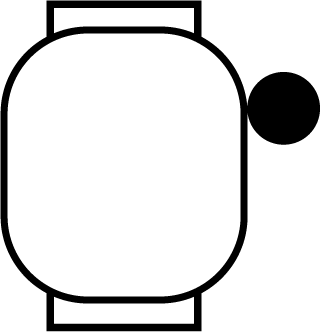 , and select Settings to customize golf settings and features.
Scoring: Allows you to set your scoring preferences and turn on statistics tracking.
Driver Distance: Sets the average distance the ball travels from the tee box on your drive.
PlaysLike: Sets preferences for the “plays like” distance feature, which shows adjusted distances to the green while playing golf (PlaysLike Distance Icons).
NOTE: This feature requires a Garmin Golf subscription.
Contour Shading: Enables elevation or slope contour shading for the greens on courses with green contour data (Garmin Golf App).
Virtual Caddie: Enables automatic or manual virtual caddie club recommendations. Appears after you play five rounds of golf, track your clubs, and upload your scorecards to the Garmin Golf app.
Big Numbers: Changes the size of the numbers on the hole view screen.
Tournament Mode: Disables the PinPointer and PlaysLike distance features. These features are not allowed during sanctioned tournaments or handicap calculation rounds.
Golf Distance: Sets the unit of measure for distance.
Golf Wind Speed: Sets the unit of measure for wind speed while playing golf.
Club Prompt: Displays a prompt that enables you to enter which club you used after each detected shot.
Satellites: Sets the satellite system to use for the activity (Satellite Settings).
Record Activity: Enables activity FIT file recording for golf activities. FIT files record fitness information that is tailored for the Garmin Connect app.
Club Sensors: Allows you to set up your compatible Approach CT10 club tracking sensors.
Pair Rangefinder: Pairs the watch to your compatible rangefinder.
The PlaysLike distance feature accounts for elevation changes on the course, wind speed, wind direction, and air density by showing the adjusted distance to the green. During a round, you can tap a distance to the green to view the PlaysLike distance. You can swipe up to see how much the distance has changed due to each of the factors.
TIP: You can configure what data is factored into the PlaysLike adjustments in the activity settings (Golf Settings).
 : Distance plays longer than expected.
 : Distance plays as expected.
 : Distance plays shorter than expected.
 : The difference in the distance due to elevation changes.
 : The difference in the distance due to the wind speed and direction.
 : The difference in the distance due to the air density.