The Varia App
The Varia app connects to your Varia Vue headlight using Bluetooth technology. The app displays light information, settings, videos, and photos.
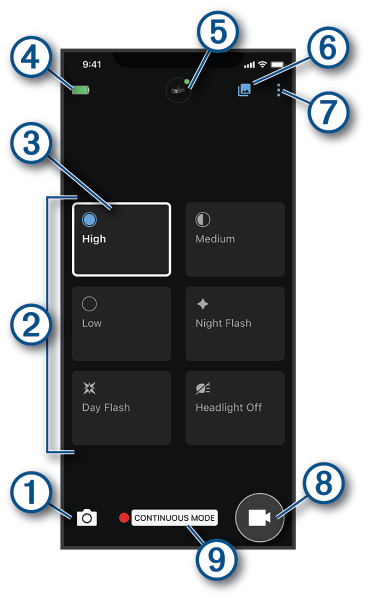
|
|
Select to take a photo. |
|
|
Displays the available light setting modes (Headlight Light Intensity Modes). |
|
|
Indicates your current light setting mode. |
|
|
Displays the battery status of the paired Varia device. |
|
|
Select to change the device and camera settings (Varia App Device Settings). |
|
|
Select to open the video and photo gallery (Viewing Videos and Photos on the Varia App). |
|
|
Select to update the sounds and alerts on your phone (Customizing the Varia App Sounds and Alerts Settings). Select to view your Vault videos, settings, and more. NOTE: Vault features require a paid subscription (Vault Storage). |
|
|
Select to start saving a video. |
|
|
Displays your current recording mode (Changing Your Recording Mode). |









You can download the Varia app from the app store on your phone.