|


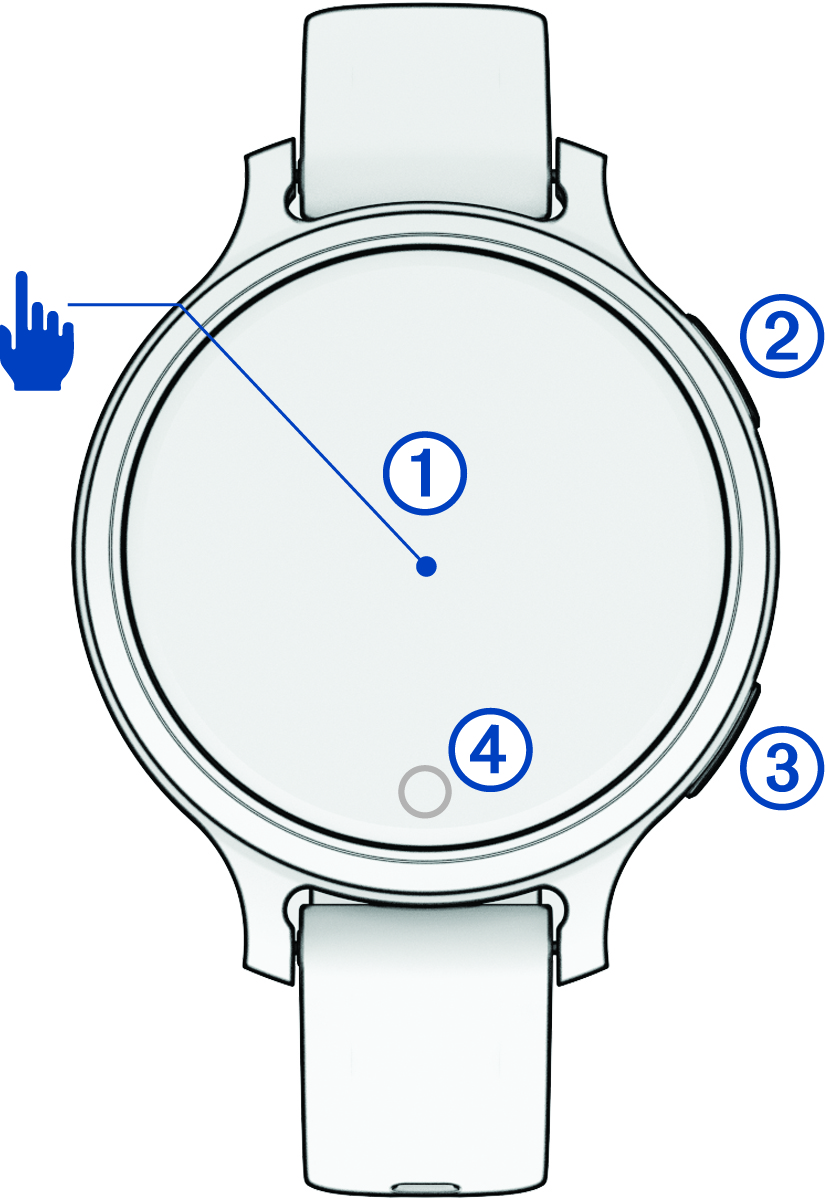
Touchscreen
|
- Tap to choose an option in a menu.
- Tap to open the widget to view more data.
- Double-tap to wake the watch.
- Swipe right or left to scroll through widgets.
- Swipe up or down to scroll through menus.
|
|


Upper-right button
|
- Press to turn on the watch.
- Press to wake the watch.
- Press to open the activities and apps menu.
- Press to start and stop the activity timer.
- Hold for 2 seconds to view the controls menu, including power.
- Hold until the watch vibrates to request assistance (Requesting Assistance).
|
|


Lower-left button
|
- Press to return to the previous screen, except during an activity.
- During an activity, press to mark a new lap, start a new set or pose, or advance to the next stage of a workout.
- Hold to view a menu of watch settings and options for the current screen.
|
|


Touch button
|
- Press to return to the previous screen, except during an activity.
- Hold to view the shortcut feature (Setting Up the Touch Button Shortcut).
- From the watch face, press to cycle through data, such as steps and heart rate.
|