Viewing Tide Information
NOTE: Depending on your GPS location, the tide information is compiled from data provided by Taiwan Central Weather Bureau in Taiwan, Japan Meteorological Agency in Japan, National Marine Data Information Center (through QWeather) in China, Korea Hydrographic and Oceanographic Agency in Korea, and World Weather Online in other parts of the world.
 WARNING
Tide information is for information purposes only. It is your responsibility to heed all posted water-related guidance, to remain aware of your surroundings, and to use safe judgment in, on, and around the water at all times. Failure to heed this warning could result in serious personal injury or death.
When you pair your watch with a compatible phone, you can view information about a tide station, including the tide height and when the next high and low tides will occur.
- From the watch face, press GPS.
- Select Tides.
- Select an option:
- Select a favorite or recently used tide station.
- To use your current location when you are near a tide station, select Add > Current Location.
- To select a saved location, select Add > Saved.
- To enter coordinates for a location, select Add > Coordinates.
A 24-hour tide chart appears for the current date with the current tide height  and information about the next tide
  .
.
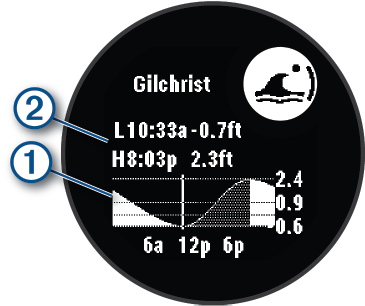
- Press DOWN to see tide information for upcoming days.
- Press GPS, and select Set as Favorite to set this location as your favorite tide station.
Your favorite tide station appears at the top of the list in the app and in the glance.
- From the Tides app, select a saved tide station.
- Press GPS, and select Set Alerts.
- Select an option:
- To set an alarm to sound before the peak tide, select Til High Tide.
- To set an alarm to sound before the low tide, select Til Low Tide.