Heading Settings
You can set the behavior of the pointer that appears when navigating.
Hold MENU, and select Navigation > Type.
Bearing: Points in the direction of your destination.
Course: Shows your relationship to the course line leading to the destination.
Course Pointer
The course pointer is most useful when you are navigating to your destination in a straight line, such as when you are navigating on water. It can help you navigate back to the course line when you go off-course to avoid obstacles or hazards.
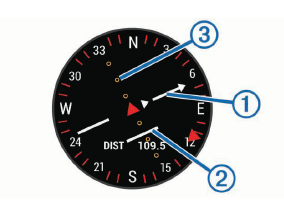
The course pointer  indicates your relationship to the course line leading to the destination. The course deviation indicator (CDI)
  provides the indication of drift (right or left) from the course. The dots
  tell you how far off course you are.