Swing Tempo Training
The Tempo Training activity helps you perform a more consistent swing. The device measures and displays your backswing time and downswing time. The device also displays your swing tempo. Swing tempo is the backswing time divided by the downswing time, expressed in a ratio. A 3 to 1 ratio, or 3.0, is the ideal swing tempo based on studies of professional golfers.
The Ideal Swing Tempo
You can achieve the ideal 3.0 tempo using different swing timings, for example, 0.7 sec./0.23 sec. or 1.2 sec./0.4 sec. Each golfer may have a unique swing tempo based on their ability and experience. Garmin provides six different timings.
The device displays a graph that indicates if your backswing or downswing times are too fast, too slow, or just right for the selected timing.
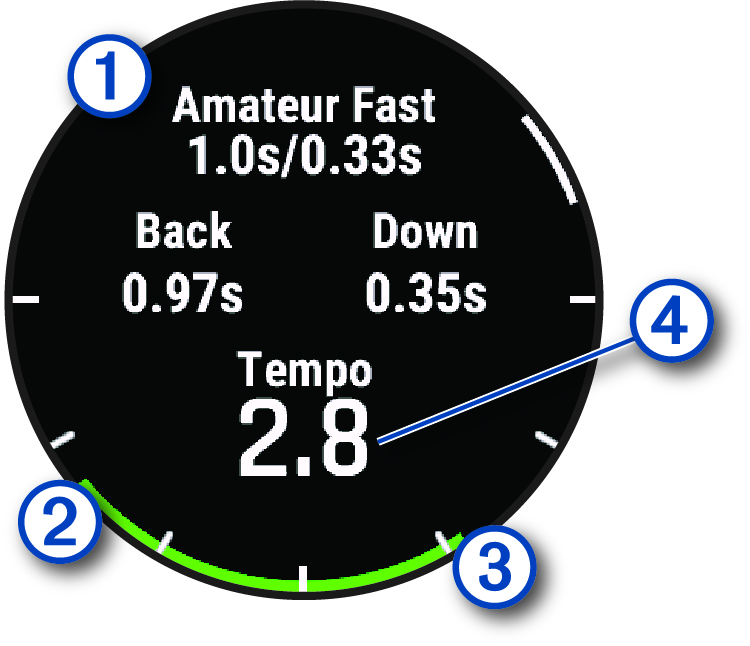
|
|
Timing choices (backswing to downswing time ratio) |
|
|
Backswing time |
|
|
Downswing time |
|
|
Your tempo |
|
|
Good timing |
|
|
Too slow |
|
|
Too fast |





To find your ideal swing timing, you should start with the slowest timing and try it for a few swings. When the tempo graph is consistently green for both your backswing and downswing times, you can move up to the next timing. When you find a timing that is comfortable, you can use it to achieve more consistent swings and performance.
Analyzing Your Swing Tempo
You must hit a ball to view your swing tempo.
- Press START.
- Select Tempo Training.
- Press START.
- Select Swing Speed, and select an option.
- Complete a full swing, and hit the ball.
The watch displays your swing analysis.
Viewing the Tip Sequence
The first time you use the Tempo Training activity, the watch displays a tip sequence to explain how your swing is analyzed.
- During your activity, press START.
- Select Tips.
- Press START to view the next tip.