Buttons
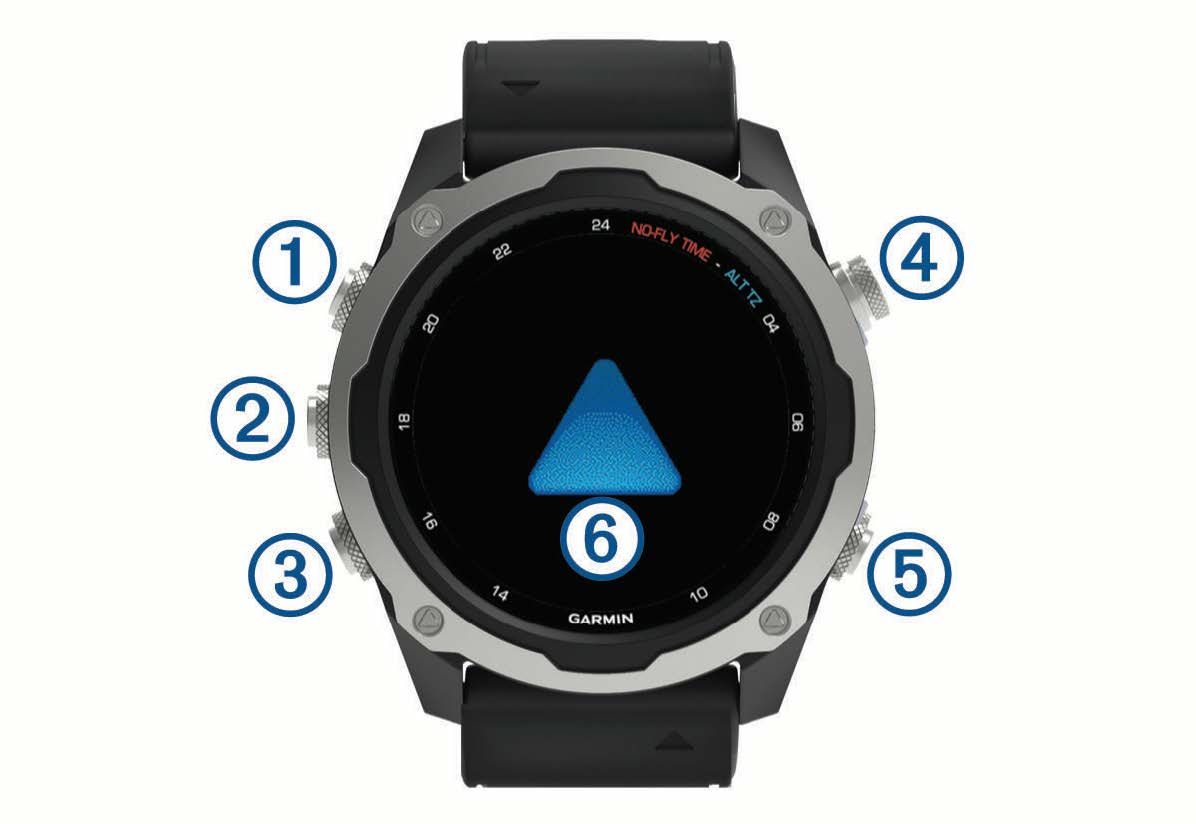
 LIGHT
LIGHT
- Press to turn the backlight on and off.
- Press to turn the device on.
- Hold to view the controls menu.
NOTE: While diving, hold functions are disabled.
 MENU·UP
- Press to scroll through the widget loop and menus.
- Hold to view the menu.
NOTE: You can enable or disable this button for dive activities (Dive Setup).
 DOWN
DOWN
- Press to scroll through the widget loop and menus.
- Press to scroll through the data screens during a dive.
- Hold to view the music controls from any screen.
NOTE: While diving, hold functions are disabled.
 START·STOP
- Press to view the activity list and start or stop an activity.
- Press to choose an option in a menu.
- Press to view the menu during a dive.
 BACK·LAP
- Press to return to the previous screen.
- Press to exit a menu during a dive.
- Press to record a lap, rest, or transition during a multisport activity.
- Hold to view the watch face from any screen.
- Hold to return to the primary data screen during a dive.
 : Double tap the device to scroll through the data screens during a dive.