Default Watch Face
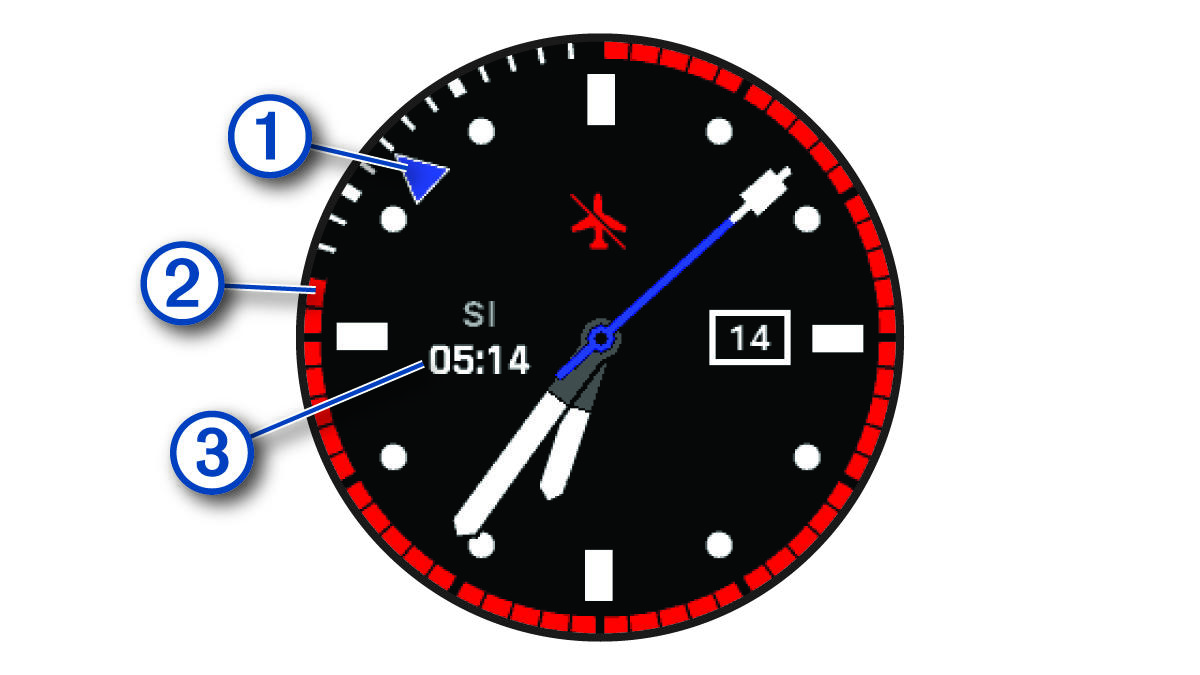
|
|
Alternate time zone pointer. References the 24-hour time markings on the watch (Adding Alternate Time Zones). |
|
|
No-fly time remaining. References the 24-hour time markings on the watch (No-Fly Time). |
|
|
Surface interval (SI) time after a dive. |


To use the connected features on your watch, you must pair it directly through the Garmin Dive app, instead of from the Bluetooth® settings on your smartphone.
- From the app store on your smartphone, install and open the Garmin Dive app.
- Select an option to enable pairing mode on your watch:
- During the initial setup, select Yes when you are prompted to pair with your smartphone.
- If you previously skipped the pairing process, hold MENU, and select Pair Phone.
- Select an option to add your watch to your account:
- If this is the first time you are pairing a device with the Garmin Dive app, follow the on-screen instructions.
- If you already paired another device with the Garmin Dive app, select Add > Devices, and follow the on-screen instructions.