Pulse Oximeter
Your watch has a wrist-based pulse oximeter to gauge the peripheral saturation of oxygen in your blood (SpO2). As your altitude increases, the level of oxygen in your blood can decrease. Knowing your oxygen saturation can help you determine how your body is acclimating to high altitudes for alpine sport and expedition.
You can manually begin a pulse oximeter reading by viewing the pulse oximeter glance (). You can also turn on all-day readings (). When you view the pulse oximeter glance while you are not moving, your watch analyzes your oxygen saturation and your elevation. The elevation profile helps indicate how your pulse oximeter readings are changing, relative to your to elevation.
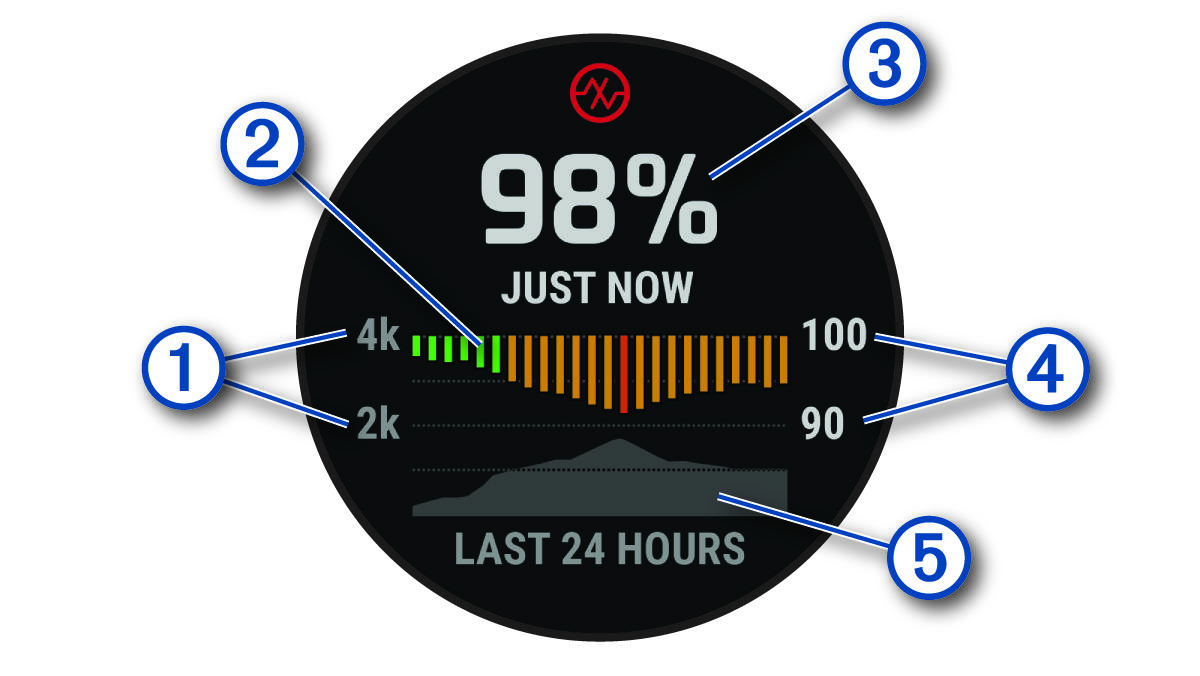
On the watch, your pulse oximeter reading appears as an oxygen saturation percentage and color on the graph. On your Garmin Connect account, you can view additional details about your pulse oximeter readings, including trends over multiple days.
For more information about pulse oximeter accuracy, go to Garmin.com/ataccuracy.
|
|
The elevation scale. |
|
|
A graph of your average oxygen saturation readings for the last 24 hours. |
|
|
Your most recent oxygen saturation reading. |
|
|
The oxygen saturation percentage scale. |
|
|
A graph of your elevation readings for the last 24 hours. |





Getting Pulse Oximeter Readings
You can manually begin a pulse oximeter reading by viewing the pulse oximeter glance. The glance displays your most recent blood oxygen saturation percentage, a graph of your hourly average readings for the last 24 hours, and a graph of your elevation for the last 24 hours.
NOTE: The first time you view the pulse oximeter glance, the watch must acquire satellite signals to determine your elevation. You should go outside, and wait while the watch locates satellites.
- While you are sitting or inactive, press UP or DOWN from the watch face to view the pulse oximeter glance.
- Press START to view glance details and begin a pulse oximeter reading.
- Remain motionless for up to 30 seconds.
NOTE: If you are too active for the watch to get a pulse oximeter reading, a message appears instead of a percentage. You can check again after several minutes of inactivity. For best results, hold the arm wearing the watch at heart level while the watch reads your blood oxygen saturation.
- Press DOWN to view a graph of your pulse oximeter readings for the last seven days.