Ranging Display Overview
|
① |
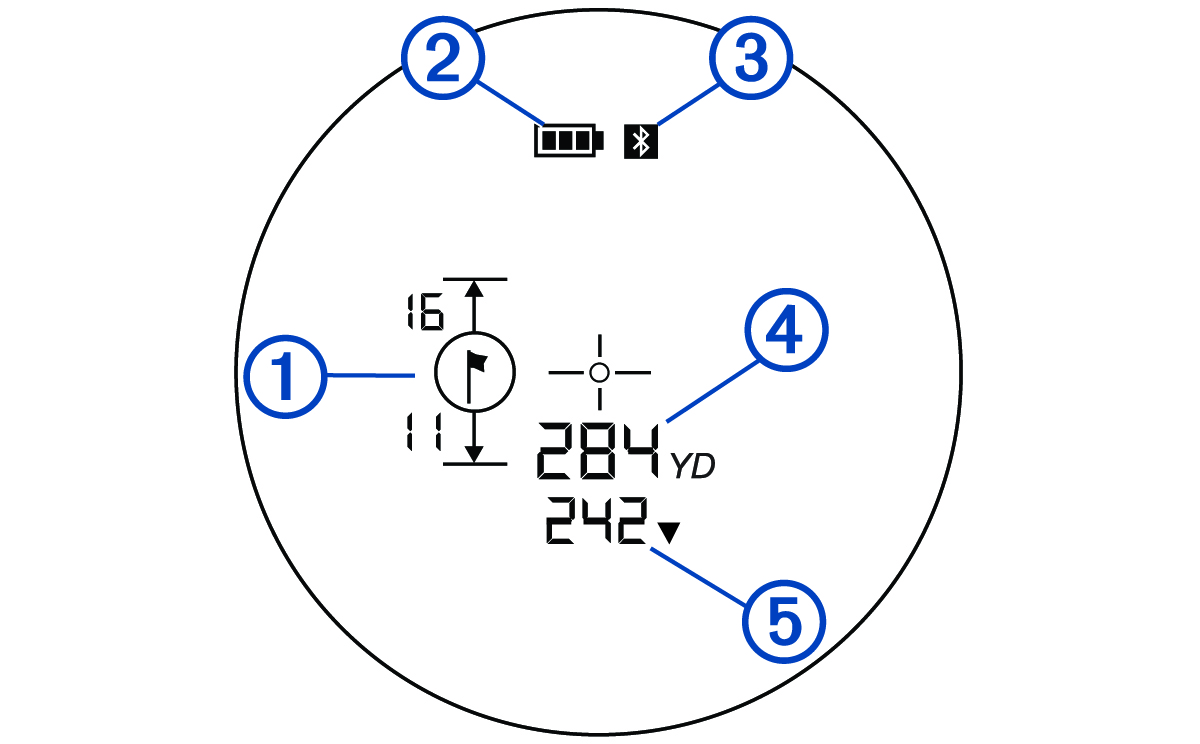
Indicates the rangefinder is locked on to the pin for the current hole and displays the distances to the front and the back of the green for that hole. (Measuring the Distance to the Pin) NOTE: To use this feature, your rangefinder must be paired to the Garmin Golf app or a compatible device (Pairing Your Phone, Pairing a Compatible Device). |
|
② |
Indicates the battery level of the rangefinder. When the rangefinder is awake and the battery is low (under 10%), the battery indicator is always displayed. |
|
③ |
Indicates the Bluetooth connectivity status.
|
|
④ |
Displays the measured distance to a target (Measuring the Distance to a Target). |
|
⑤ |
The PlaysLike distance feature accounts for elevation changes on the course by showing the adjusted distance to the green. When connected to a compatible device, the PlaysLike distance feature also accounts for data provided by that device, such as wind and weather data.
NOTE: Tournament mode disables the PlaysLike distance feature (Using Tournament Mode). |
 : distance plays longer than expected.
 : distance plays shorter than expected.