Playing Golf
NOTE: If you found a golf course with data that’s inaccurate or outdated, please send us a report at Report a Golf Course Issue.
Before you play golf, you should charge the watch (Charging the Watch).
NOTE: Some features are only available with a Garmin Golf subscription.
- Press
 .
. - Select Play Golf.
The device locates satellites, calculates your location, and selects a course if there is only one course nearby.
- If the course list appears, select a course from the list.
- Select
 to keep score.
 - Select a tee box.
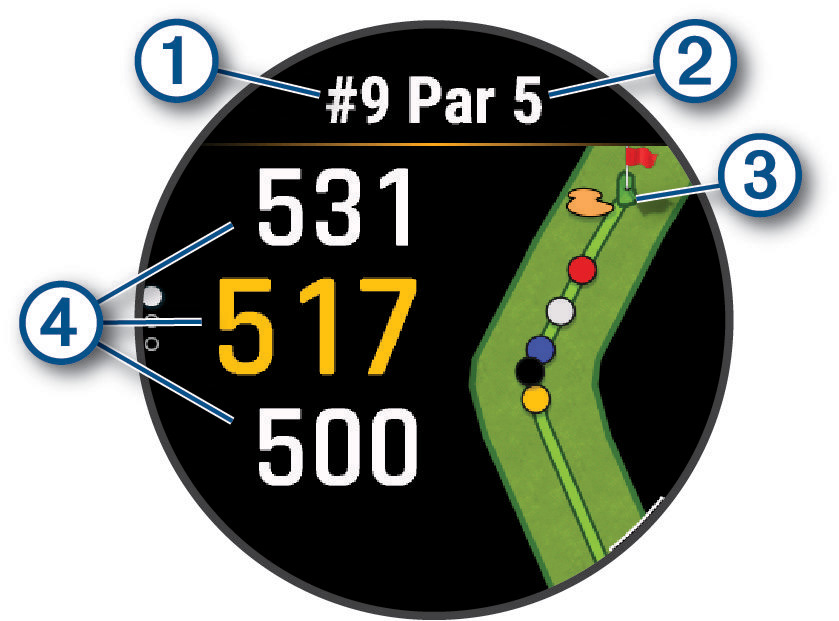
The hole information screen appears.
|
|
Current hole number |
|
|
Par for the hole |
|
|
Map of the hole. |
|
|
Distances to the front, middle, and back of the green. |

NOTE: Because pin locations change, the watch calculates the distance to the front, middle, and back of the green, but not the actual pin location.
- Select an option:
- Tap the front, middle, or back distances to the green to view the PlaysLike distance (PlaysLike Distance Icons).
- Swipe up or down on the front, middle, or back distances to the green to view additional data, including your handicap rating and the PlaysLike factors.
- Tap the map to view more detail or measure distance with touch targeting (Measuring Distance with Touch Targeting).
- Tap the map and select
 or
or  to view the location and distance to a layup or to the front and back of a hazard (Hazards and Layups).
 - Press to open the golf menu (Golf Menu).
When you move to the next hole, the watch automatically transitions to display the new hole information.