Viewing Hazards, Layups, and Doglegs
You can view distances to hazards, layups, and doglegs along the fairway for par 4 and 5 holes. Hazards that affect shot selection are displayed individually or in groups to help you determine the distance to layup or carry.
- Select an option:
- From the hole view screen, select
 .
. - When using big numbers mode, press the button and select Hazards and Layups.
- From the hole view screen, select
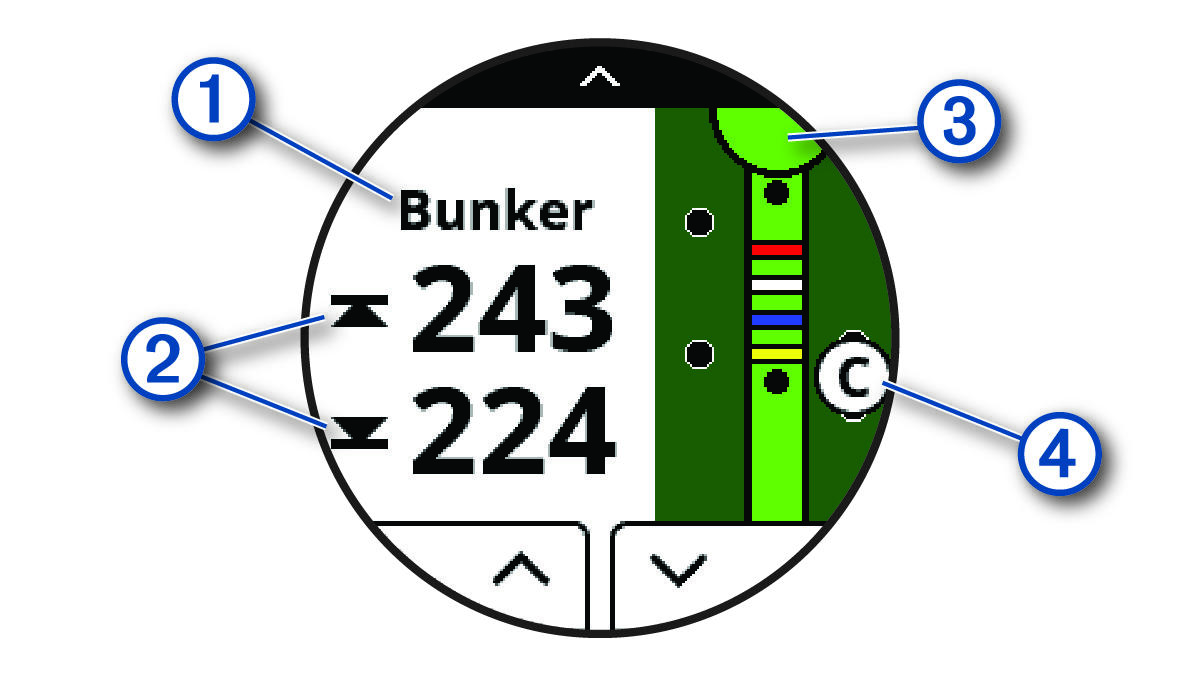
- The hazard type, layup and distance, or dogleg and distance
 is listed at the top of the page.
 - The distances to the front and back
 of the nearest hazard, layup, or dogleg appear on the screen.
NOTE: If your hazard has a single point, the distance to the center appears on the screen.
- The green is represented as a half circle
 at the top of the screen. The line below the green represents the center of the fairway.
 - Hazards, layups, and doglegs
 are shown below the green in approximate locations relative to the fairway.
- Select
 or
or  to view other hazards, layups, or doglegs for the current hole.