Preparing for a Shot
- Place the ball at the desired tee location.
NOTE: The tee location must be at least 8 ft. (2.4 m) away from the net when playing indoors.
- Attach the device to the tripod mount (Installing the Magnetic Tripod Mount).
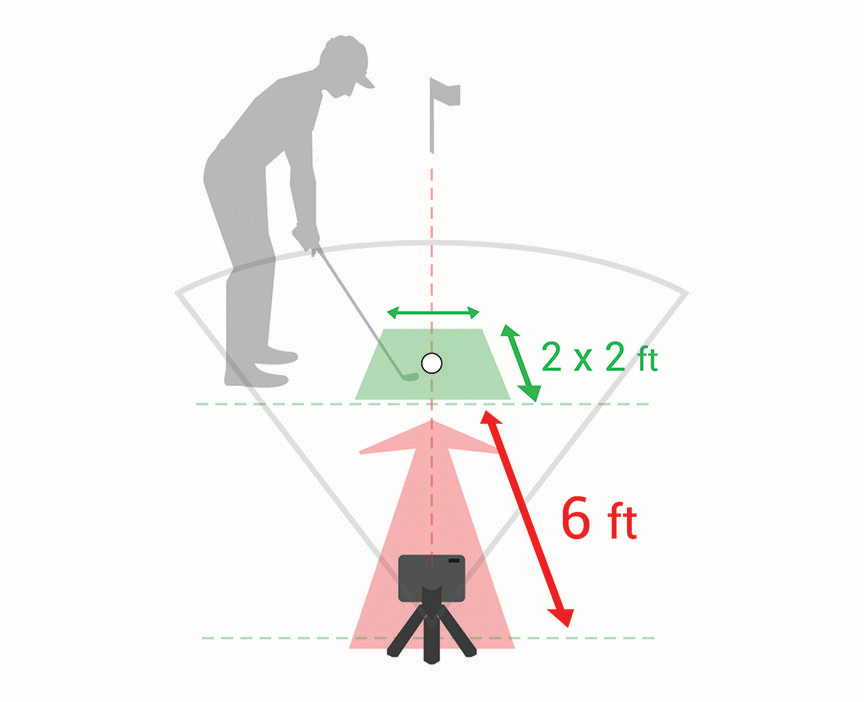
- Place the device on the ground between 6 ft. and 8 ft. (1.8 m and 2.4 m) behind the tee location.
NOTE: If you are using a golf mat, make sure the bottom edge of the device sits above the mat.
- Adjust the device so the red alignment line is aligned with the tee location and the target of the shot.
TIP: You can lay a golf club on the ground between the alignment line and tee location to confirm they are lined up.
- If necessary, you can move the tee location up to 1 ft. (0.3 m) on either side of the target line, within a 2 x 2 ft. (0.6 x 0.6 m) hitting area that begins 6 ft. (1.8 m) from the device.
This may be helpful if your tee location becomes worn during a golf simulator game mode session.
NOTE: The ball and club angles are measured parallel to the target line.
- Press the button to turn on the device.
- Start a golf simulator game mode (Using the Golf Simulator Features).
- Wait for the status LED to begin flashing green, and take a shot.